How To: Maximize Midjourney Parameters
ai.fantasy.co
“Midjourney is a powerful tool, and understanding how to speak its language is important if you want to truly harness what it’s capable of.”
Midjourney parameters are instructions added to the end of a prompt that steer the output in specific ways. In this 2023 how-to, Fantasy’s Mark Edwards walks through five of them, with what each one does, its default value and an example prompt. Version details reflect Midjourney 5.1, 5.2 and Niji 5, current when the guide was written.
Read the full guide on ai.fantasy.co
Key points
What do the main Midjourney parameters do?
- Aspect ratio (--ar). Sets the image’s shape and influences its composition. The default is 1:1, and wide ratios such as 16:9 tend toward cinematic framing.
- Quality (--q). Controls render time and detail. The default is 1, and --q .25 gives a looser, painterly result.
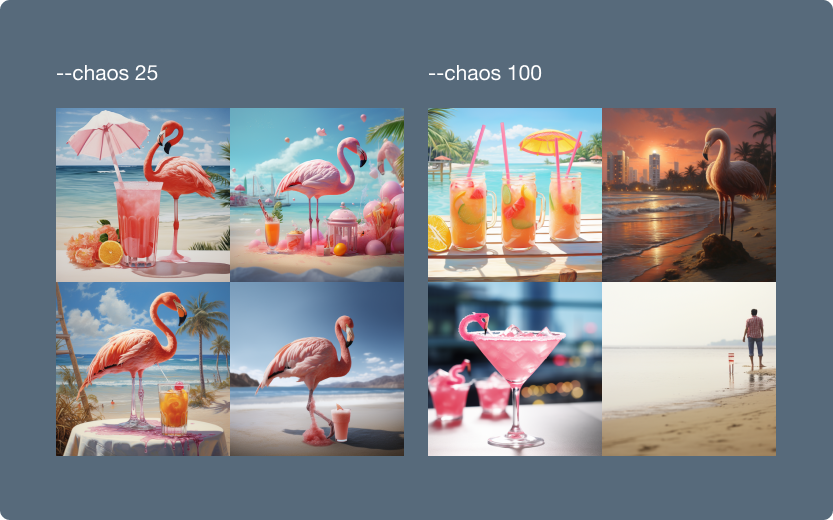
- Chaos (--chaos). Adds variety to the first grid of images. The default is 0, and 100 gives highly varied results.
- Style (--style). Switches away from the default look. --style raw sharpens edges for a more photorealistic effect.
- Stylize (--stylize). Sets how strongly Midjourney applies artistic color, composition and form, from 0 to 1000 with a default of 100.